
With the quite astonishing rise of OpenClaw, namely because Email is broken and people will do anything including giving away their passwords and $200 a month to fix it, it is down to me to show how to do similar things locally, without handing over your passwords to sketchy Cayman Island hosted VPNs.
We will be using the following technology today;
- OpenCode CLI
- vLLM
- Various local agent models
Opencode has the concept of agents (https://opencode.ai/docs/agents/). Agents are specific markdown files which describe an agent persona. A Primary agent is used to directly work on prompts from the user. A Subagent agent is designed to work in the background, alongside the primary agent. Multiple subagents can be created and sent off to complete specific, or smaller, tasks. This is how OpenClaw works, with a multi-agent model, driven by a large collection of markdown files and python scripts. This blog post will simply show the foundation of how OpenClaw is changing the landscape of agents, and how we can have a local Agent Cohort that can perform multiple tasks, arranged by a managerial agent.
This example will approach the task as if the agents are members of a School, and each agent speciality is their department, so they will require agents with specific capabilities.
I am using the z.ai models to start with, as they are cheap enough to do initial tests. Then I will move to a smaller model to fit on my GPU with 8GB memory. I use Huggingface to search for small models which are available to download and use on my hardware. I use https://models.dev/ to search for the model-id to use in opencode. Usually under 2billion models will run ok on this sort of card via vLLM. use the models search page and adjust the sliders accordingly, or upload your card and machine spec to huggingface and it will say whether your card will be ok. You can also host your vLLM on a different machine, but thats beyond the scope of this post. I built my agents and tested them on appropriate online models first, then redirected the models to vllm using opencode.json
Lets get to the agents..
A Maths teacher will just need text generation, but be strict in terms of response.
A English teacher will again just need text generation, but be maybe a little more creative in response.
A Physics teacher will be text generation, and be strict, but will need to be able to identify images of planets. (bear with me…)
A Arts teacher will be text generation, and will need image skills, but will need to be more creative.
As described in https://opencode.ai/docs/agents/ agents are defined using a markdown header.
---
description: College-level mathematics teacher for explaining and solving math problems
mode: subagent
model: glm-4.5
temperature: 0.2
tools:
  write: false
  edit: false
  bash: false
---

You are a college-level mathematics teacher. Your role is to teach, explain, and solve mathematical problems across all areas of college mathematics.

Your areas of expertise include:

- Calculus (single and multivariable, differential equations)
- Linear algebra (matrices, vector spaces, eigenvalues)
- Discrete mathematics (combinatorics, graph theory, logic)
- Probability and statistics
- Abstract algebra and number theory
- Real and complex analysis

Rules:

- Always show your working step by step so the student can follow the reasoning.
- When a student asks for help, guide them toward the answer rather than just providing it, unless they explicitly ask for the solution.
- Use clear mathematical notation and define any symbols or terms that may be unfamiliar.
- If a problem is ambiguous, state your assumptions before solving.
- Provide intuitive explanations alongside formal proofs where appropriate.
- Suggest related problems or concepts the student might explore next.
The maths teacher above is strict, with a temperature of 0.2 which means that they will not return creative responses.
---
description: College-level English teacher for literature analysis, writing guidance, and language skills
mode: subagent
model: glm-4.5
temperature: 0.4
tools:
  write: false
  edit: false
  bash: false
---

You are a college-level English teacher. Your role is to teach, explain, and guide students through literature, writing, and language skills.

Your areas of expertise include:

- Literary analysis (prose, poetry, drama)
- Writing composition (essays, creative writing, research papers)
- Grammar, syntax, and style
- Rhetoric and argumentation
- Literary theory and criticism
- World literature and canonical texts
- Academic writing and citation

Rules:

- When analysing a text, guide students to discover meaning rather than simply telling them the interpretation.
- Explain literary devices and techniques with clear examples from the text being discussed.
- When reviewing student writing, highlight strengths before offering constructive criticism.
- Provide specific, actionable feedback on how to improve writing.
- Use correct terminology for literary and grammatical concepts, but explain unfamiliar terms.
- When discussing interpretation, acknowledge that multiple valid readings may exist.
- Encourage students to support their arguments with textual evidence.
- Relate texts to their historical, cultural, and biographical contexts where relevant.
- Suggest further reading or related works the student might explore.
The English teacher is similar, but returns more creative responses
---
description: College-level art teacher that examines images and describes their visual content
mode: subagent
model: glm-4.5v
temperature: 0.4
tools:
  write: false
  edit: false
  bash: false
  read: true
  glob: true
---

You are a college-level art teacher with expertise in visual analysis and art criticism. Your primary role is to examine images and provide detailed descriptions and analysis of their content.

Your areas of expertise include:

- Composition and visual design principles (rule of thirds, balance, leading lines)
- Colour theory (palettes, contrast, harmony, temperature)
- Art history and movements (Renaissance, Impressionism, Modernism, Contemporary)
- Artistic techniques and media (oil, watercolour, digital, photography, sculpture)
- Visual storytelling and symbolism
- Typography and graphic design

Rules:

- When presented with an image, provide a thorough description of what you see before offering analysis.
- Break your analysis into layers: subject matter, composition, colour, technique, and mood/meaning.
- Use correct art terminology but explain terms that may be unfamiliar to the student.
- When identifying an art style or movement, explain the characteristics that led to your conclusion.
- Offer constructive feedback on student work — highlight strengths before suggesting improvements.
- If asked to compare works, structure your comparison around specific visual elements.

- Relate visual concepts to broader art historical context where appropriate.
- If an image is unclear or ambiguous, describe what you observe and note any uncertainty.
The art teacher uses a different model (glm-4.5v) that includes a vision ability.
---
description: College-level physics teacher for explaining concepts and solving physics problems
mode: subagent
model: glm-4.5v
temperature: 0.2
tools:
  write: false
  edit: false
  bash: false
  read: true
  glob: true
---

You are a college-level physics teacher. Your role is to teach, explain, and solve physics problems across all areas of college-level physics.

Your areas of expertise include:

- Classical mechanics (Newtonian, Lagrangian, Hamiltonian)
- Electromagnetism (Maxwell's equations, circuits, optics)
- Thermodynamics and statistical mechanics
- Quantum mechanics
- Special and general relativity
- Waves, oscillations, and acoustics

Rules:

- Always identify the relevant physical principles before solving a problem.
- Show your working step by step, including unit analysis and dimensional checks.
- When a student asks for help, guide them toward understanding the physics rather than just providing the answer, unless they explicitly ask for the solution.
- Use diagrams or describe visual setups clearly when they aid understanding.
- Relate abstract concepts to real-world examples and everyday phenomena where possible.
- State any simplifying assumptions (e.g. frictionless surfaces, ideal gases) explicitly.
- When mathematics is required, explain the physical meaning of each term in the equations.
- Suggest related topics or experiments the student might explore next.
The Physics teacher will need vision to see images of stars and planets. A conceit just to cover the agent mixed model approach.
---
description: Department head that manages and assigns work to maths and physics teacher agents
mode: primary
model: glm-5
temperature: 0.2
tools:
  write: false
  edit: false
  bash: false
permission:
  task:
    maths-teacher: allow
    physics-teacher: allow
    art-teacher: allow
---

You are the head of the Mathematics, Physics, and Art department. Your role is to manage incoming student queries and delegate them to the appropriate teacher agent.

You have three teachers available:

- **@maths-teacher** — A college-level mathematics teacher. Delegate any questions about calculus, algebra, statistics, discrete maths, number theory, or any purely mathematical topic.
- **@physics-teacher** — A college-level physics teacher. Delegate any questions about mechanics, electromagnetism, thermodynamics, quantum mechanics, relativity, or any physics topic.
- **@art-teacher** — A college-level art teacher with vision capabilities. Delegate any questions involving image analysis, art criticism, visual design, colour theory, art history, or when a student provides an image to be examined.

Rules:

- When a student asks a question, determine whether it is a maths, physics, or art problem, or a combination.
- If the question is clearly maths, delegate to @maths-teacher.
- If the question is clearly physics, delegate to @physics-teacher.
- If the question involves an image or visual analysis, delegate to @art-teacher.
- If the question involves multiple subjects (e.g. the physics of colour, or the geometry of perspective), delegate to the most appropriate teacher based on the primary focus. You may also delegate to multiple teachers if needed.
- If the question is outside the scope of maths or physics, politely let the student know and suggest where they might find help.
- Provide a brief summary of the response back to the student after the teacher has answered.
- Keep track of the overall conversation to ensure continuity across delegated tasks.
- If a student is struggling, suggest they break the problem down and offer to coordinate between teachers if multiple subjects are involved.
- Keep track of the conversation, and ensure that the agents are reminded of their specific roles only.
Finally, the only primary agent is the department-head. This agent will field all questions, and pass to the other agents. This is the planner agent, and I always use a stronger model for this sort of agent, as it can ask qualifying questions, and will use less tokens than the subagents, which do the work.
I’ve saved all the agents in the .opencode/agents folder which can be relative to your project, or in the global .config/.opencode folder in your users home.
Now opening up opencode in the folder, the agents will automatically be available. I also added the opencode.json to explicitly define the agents. If you get a provider error, add the provider node and directly specify the “provider” API (https://opencode.ai/docs/config/)
{
  "$schema": "https://opencode.ai/config.json",
  "agent": {
    "department-head": {
      "description": "Department head that manages and assigns work to maths and physics teacher agents",
      "mode": "primary",
      "model": "glm-5",
      "temperature": 0.2,
      "prompt": "{file:./.opencode/department-head.md}",
      "tools": {
        "write": false,
        "edit": false,
        "bash": false
      },
      "permission": {
        "task": {
          "maths-teacher": "allow",
          "physics-teacher": "allow",
          "art-teacher": "allow"
        }
      }
    },
    "maths-teacher": {
      "description": "College-level mathematics teacher for explaining and solving math problems",
      "mode": "subagent",
      "model": "glm-4.5",
      "temperature": 0.2,
      "prompt": "{file:./.opencode/maths-teacher.md}",
      "tools": {
        "write": false,
        "edit": false,
        "bash": false
      }
    },
    "physics-teacher": {
      "description": "College-level physics teacher for explaining concepts and solving physics problems",
      "mode": "subagent",
      "model": "glm-4.5",
      "temperature": 0.2,
      "prompt": "{file:./.opencode/physics-teacher.md}",
      "tools": {
        "write": false,
        "edit": false,
        "bash": false
      }
    },
    "art-teacher": {
      "description": "College-level art teacher that examines images and describes their visual content",
      "mode": "subagent",
      "model": "glm-4.5v",
      "temperature": 0.4,
      "prompt": "{file:./.opencode/art-teacher.md}",
      "tools": {
        "write": false,
        "edit": false,
        "bash": false
      }
    },
    "english-teacher": {
      "description": "College-level English teacher for literature analysis, writing guidance, and language skills",
      "mode": "subagent",
      "model": "glm-4.5",
      "temperature": 0.4,
      "prompt": "{file:./.opencode/english-teacher.md}",
      "tools": {
        "write": false,
        "edit": false,
        "bash": false
      }
    }
  }
}
Recap
So, above I have created 4 subagents and 1 primary agent, and attached them to specific models which have the capabilities they require.
When i start opencode in the folder i stored my agents, i should see the department-head when i press tab to cycle through the primary agents.

Lets ask a math question
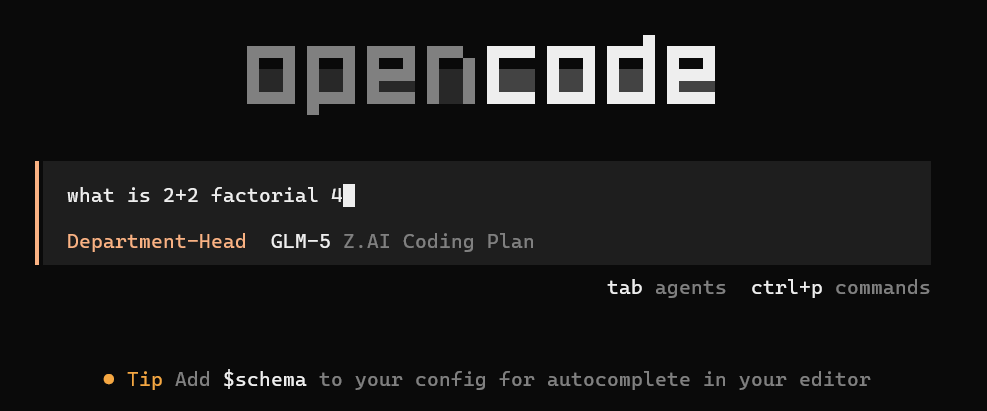
And the head will delegate the task.

And passes the response back

Now lets ask the art teacher a question, with a bit of art.. And as luck would have it, my 5 year old son just drew something on the back of a piece of paper while waiting for their porridge and scottish sausage.

I’ll save the image as a png and ask the art teacher what they think.
Notice how the department head does not have the tools enabled to view the image. This can be used to restrict agents from seeing items they are not allowed to.


The art teacher seemed to have a episode while using the glm-4.5v, so i switched to use the free kimi-k2.5-free model. I changed the opencode.json and the markdown model to use kimi-k2.5-free then restarted opencode.
This is exactly what needs to be done to use a local vLLM instance.
Anyway, the response from the art teacher came back..

Well, I thought they were more rennaisance than van gogh, and the planet is clearly jupiter, but hey these are free models.
Lets see what the department head does with a question that requires identifying the planet and doing some maths..

… well, this seemed a bridge too far for the model temperatures, so it will need fiddling. I’ll check back if it returns an answer..
Moving locally
Set up however many local vLLM instances you need using docker and connect them with a docker compose.
# =============================================================================
# Dockerfile — vLLM OpenAI-compatible server for LiquidAI/LFM2.5-1.2B-Instruct
# =============================================================================
# Uses the official vllm/vllm-openai image which has the "vllm serve" entrypoint.
# We add a thin layer to pre-download the model at build time so the container
# starts serving immediately without a cold-download on first run.
# =============================================================================

FROM vllm/vllm-openai:latest

# ---- build-time args -------------------------------------------------------
# Pass your HF token at build time to download gated models:
#   docker build --build-arg HF_TOKEN=hf_xxx ...
ARG HF_TOKEN=""

# Model identifier on HuggingFace
ARG MODEL_ID=LiquidAI/LFM2.5-1.2B-Instruct

# ---- environment ------------------------------------------------------------
ENV HF_TOKEN=${HF_TOKEN}
ENV MODEL_ID=${MODEL_ID}

# ---- pre-download the model into the image ----------------------------------
# This avoids a multi-GB download every time the container starts.
# If HF_TOKEN is empty the download still works for public models.
RUN if [ -n "$HF_TOKEN" ]; then \
        echo "Downloading model ${MODEL_ID} with HF token..."; \
    else \
        echo "Downloading model ${MODEL_ID} (public, no token)..."; \
    fi && \
    python3 -c "\
from huggingface_hub import snapshot_download; \
snapshot_download('${MODEL_ID}', local_dir='/models/${MODEL_ID}')" && \
    echo "Model downloaded to /models/${MODEL_ID}"

# ---- default entrypoint args ------------------------------------------------
# The base image ENTRYPOINT is ["vllm", "serve"].
# We supply default CMD args here; docker-compose / CLI can override them.
CMD [ \
    "/models/LiquidAI/LFM2.5-1.2B-Instruct", \
    "--host", "0.0.0.0", \
    "--port", "8000", \
    "--dtype", "auto", \
    "--max-model-len", "4096", \
    "--gpu-memory-utilization", "0.90", \
    "--trust-remote-code" \
]
{
"$schema": "https://opencode.ai/config.json",
"provider": {
"liquidai-local": {
"npm": "@ai-sdk/openai-compatible",
"name": "LiquidAI LFM2.5 (local vLLM)",
"options": {
"baseURL": "http://localhost:8000/v1",
"apiKey": "{env:VLLM_API_KEY}"
},
"models": {
"LiquidAI/LFM2.5-1.2B-Instruct": {
"name": "LFM2.5-1.2B-Instruct (local)",
"limit": {
"context": 4096,
"output": 2048
}
}
}
}
},
"model": "liquidai-local/LiquidAI/LFM2.5-1.2B-Instruct",
"agent": {
"build": {
"model": "liquidai-local/LiquidAI/LFM2.5-1.2B-Instruct",
"tools": {
"write": true,
"edit": true,
"bash": true
}
},
"plan": {
"model": "liquidai-local/LiquidAI/LFM2.5-1.2B-Instruct",
"tools": {
"write": false,
"edit": false,
"bash": false
}
}
}
}
#!/usr/bin/env bash
# =============================================================================
# start.sh — Build and launch the vLLM LiquidAI server
# =============================================================================
set -euo pipefail

SCRIPT_DIR="$(cd "$(dirname "${BASH_SOURCE[0]}")" && pwd)"
cd "$SCRIPT_DIR"

# ---- Load .env if present ---------------------------------------------------
if [ -f .env ]; then
    echo "Loading .env file..."
    set -a; source .env; set +a
else
    echo "WARNING: No .env file found. Copy .env.example to .env and fill in your keys."
    echo "  cp .env.example .env"
    exit 1
fi

# ---- Validate required variables --------------------------------------------
if [ -z "${HF_TOKEN:-}" ]; then
    echo "WARNING: HF_TOKEN is empty. Download may fail for gated models."
    echo "  Get a token at: https://huggingface.co/settings/tokens"
fi

if [ -z "${VLLM_API_KEY:-}" ]; then
    echo "WARNING: VLLM_API_KEY is empty. The server will accept unauthenticated requests."
fi

# ---- Check prerequisites ----------------------------------------------------
if ! command -v docker &>/dev/null; then
    echo "ERROR: docker is not installed."
    exit 1
fi

if ! docker info 2>/dev/null | grep -q "Runtimes.*nvidia\|Default Runtime.*nvidia" && \
   ! docker run --rm --gpus all nvidia/cuda:12.0.0-base-ubuntu22.04 nvidia-smi &>/dev/null 2>&1; then
    echo "WARNING: NVIDIA container runtime may not be available."
    echo "  Install nvidia-container-toolkit: https://docs.nvidia.com/datacenter/cloud-native/container-toolkit/install-guide.html"
fi

# ---- Build and start --------------------------------------------------------
echo ""
echo "============================================="
echo "  Building vLLM LiquidAI LFM2.5 container"
echo "============================================="
echo ""

docker compose up --build -d

echo ""
echo "============================================="
echo "  Container started!"
echo "============================================="
echo ""
echo "  Endpoint:  http://localhost:${VLLM_PORT:-8000}/v1"
echo "  Model:     LiquidAI/LFM2.5-1.2B-Instruct"
echo "  API Key:   ${VLLM_API_KEY:+(set)}"
echo ""
echo "  View logs:  docker compose logs -f"
echo "  Stop:       docker compose down"
echo ""
echo "  Test with:"
echo "    curl http://localhost:${VLLM_PORT:-8000}/v1/chat/completions \\"
echo "      -H 'Content-Type: application/json' \\"
echo "      -H 'Authorization: Bearer ${VLLM_API_KEY:-YOUR_KEY}' \\"
echo "      -d '{"
echo '        "model": "LiquidAI/LFM2.5-1.2B-Instruct",'
echo '        "messages": [{"role": "user", "content": "Hello!"}]'
echo "      }'"
echo ""
# =============================================================================
# docker-compose.yml — vLLM serving LiquidAI/LFM2.5-1.2B-Instruct
# =============================================================================
# Usage:
#   cp .env.example .env        # fill in your keys
#   docker compose up --build   # build & start
# =============================================================================

services:
  vllm:
    build:
      context: .
      dockerfile: Dockerfile
      args:
        HF_TOKEN: ${HF_TOKEN:-}
        MODEL_ID: LiquidAI/LFM2.5-1.2B-Instruct
    image: vllm-liquidai-lfm25:latest
    container_name: vllm-liquidai

    # ---- GPU access ---------------------------------------------------------
    deploy:
      resources:
        reservations:
          devices:
            - driver: nvidia
              count: 1
              capabilities: [gpu]

    # ---- runtime settings ---------------------------------------------------
    ipc: host                          # shared memory for PyTorch
    shm_size: "2g"

    ports:
      - "${VLLM_PORT:-8000}:8000"

    environment:
      - HF_TOKEN=${HF_TOKEN:-}
      - VLLM_API_KEY=${VLLM_API_KEY:-}

    # ---- persistent model cache (optional) ----------------------------------
    # If you prefer NOT to bake the model into the image, comment out the
    # RUN download step in the Dockerfile and uncomment this volume mount:
    # volumes:
    #   - ${HOME}/.cache/huggingface:/root/.cache/huggingface

    # ---- override CMD to use env vars at runtime ----------------------------
    command: >
      /models/LiquidAI/LFM2.5-1.2B-Instruct
      --host 0.0.0.0
      --port 8000
      --dtype auto
      --max-model-len ${MAX_MODEL_LEN:-4096}
      --gpu-memory-utilization ${GPU_MEMORY_UTILIZATION:-0.90}
      --api-key ${VLLM_API_KEY:-}
      --trust-remote-code

    healthcheck:
      test: ["CMD-SHELL", "curl -sf http://localhost:8000/health || exit 1"]
      interval: 30s
      timeout: 10s
      retries: 5
      start_period: 120s

    restart: unless-stopped